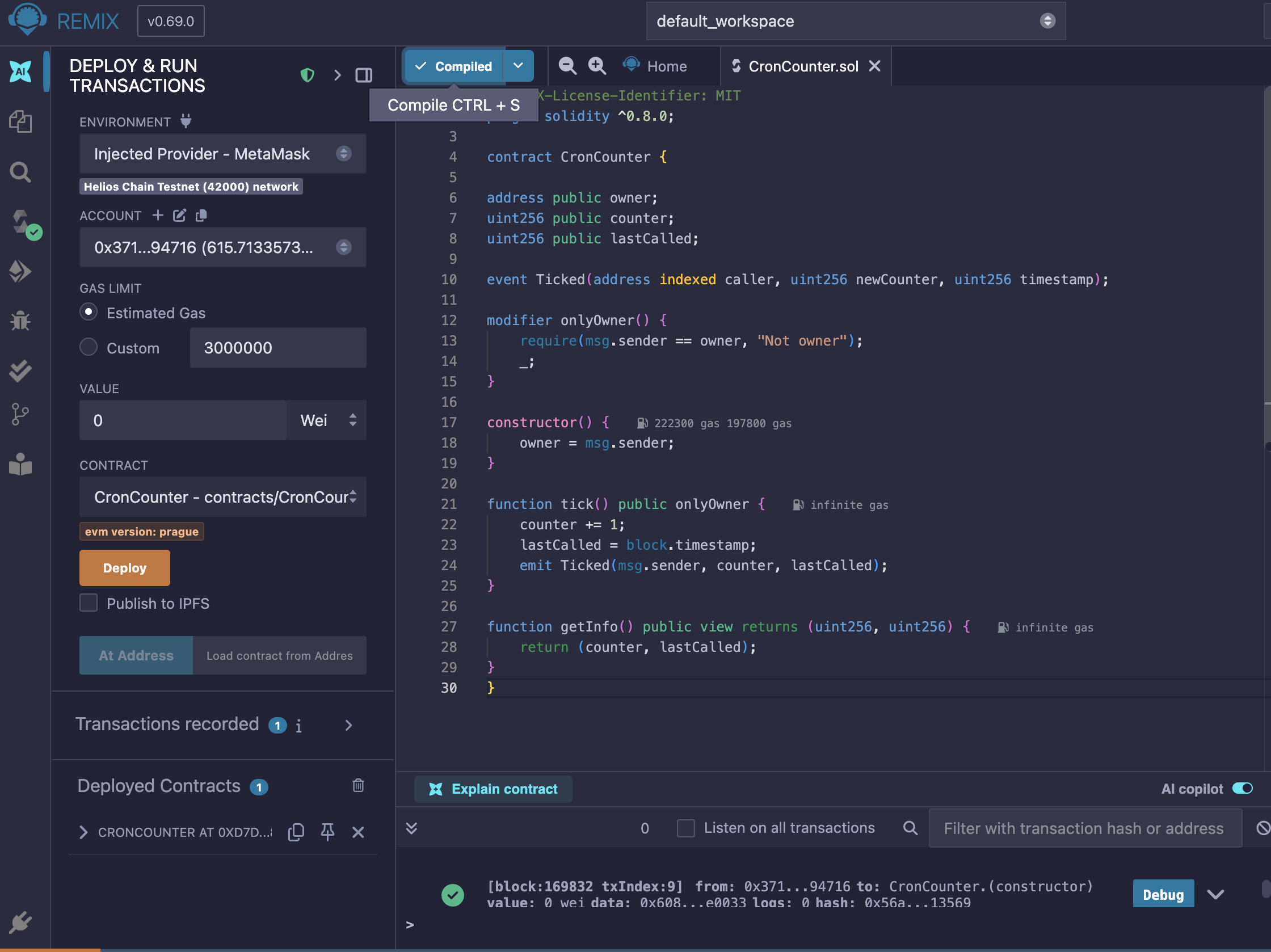
Create a Smart Contract in Remix
- Create a file named CronCounter.sol and enter the following code:
→ solidity
// SPDX-License-Identifier: MIT
pragma solidity ^0.8.0;
contract CronCounter {
address public owner;
uint256 public counter;
uint256 public lastCalled;

event Ticked(address indexed caller, uint256 newCounter, uint256 timestamp);

modifier onlyOwner() {
    require(msg.sender == owner, "Not owner");
    _;
}

constructor() {
    owner = msg.sender;
}

function tick() public onlyOwner {
    counter += 1;
    lastCalled = block.timestamp;
    emit Ticked(msg.sender, counter, lastCalled);
}

function getInfo() public view returns (uint256, uint256) {
    return (counter, lastCalled);
}
}
-
Compile Contract
In the “Solidity Compiler” tab
Select version 0.8.x
Click Compile -
Deploy Contract
In the “Deploy & Run Transactions” tab
Select Injected Provider - MetaMask
Click Deploy
Note the deployed address (it will be used in the JavaScript script)
Guide to Running Helios Cron Script in Termux (Android)
- Install Termux from Official Sources
 Don’t install from the Play Store, use it from:
F-Droid: Termux | F-Droid - Free and Open Source Android App Repository
Or from GitHub Termux APK
- Update & Install Node.js
→ bash
pkg update && pkg upgrade
pkg install nodejs
Verification:
→ bash
node -v
npm -v
The Node.js version (v18+) and NPM should be displayed.
- Create a Cron Script Folder and File
→ bash
mkdir helios-cron
cd helios-cron
nano cron-counter.js
The nano editor will open in Termux.
Paste the JavaScript code (cron-counter.js) into nano. For example:
→ js
const { ethers } = require(“ethers”);
// Replace this:
const TARGET_CONTRACT = “0xYourContractAddressHere”;
const PRIVATE_KEY = “0xYourPrivateKeyHere”;
// Leave the rest as shown…
Once finished, press:
CTRL + O → Enter (to save)
CTRL + X (to exit)
- Install ethers.js Library
→ bash
npm init -y
npm install ethers
Run the Script
Make sure you’ve replaced:
0xYourContractAddressHere → your contract address
0xYourPrivateKeyHere → the private key from your Helios testnet wallet
Then run:
→ bash
node cron-counter.js
If successful, the output should look like:
 TX Hash: 0x…
 Cron job registered!
Code : cron-counter.js
const { ethers } = require(“ethers”);
const TARGET_CONTRACT = “0xYourContractAddressHere”; // Ganti dgn alamat kontrakmu
const PRIVATE_KEY = “0xYourPrivateKeyHere”; // Ganti dgn private key kamu
const provider = new ethers.JsonRpcProvider(“https://testnet1.helioschainlabs.org”);
const wallet = new ethers.Wallet(PRIVATE_KEY, provider);
const CRON_ADDRESS = “0x0000000000000000000000000000000000000830”; // Alamat precompile Cron
const targetAbi = JSON.stringify([
{ name: “tick”, type: “function”, inputs: , outputs: , stateMutability: “nonpayable” }
]);
const cronAbi = [
{
inputs: [
{ internalType: “address”, name: “contractAddress”, type: “address” },
{ internalType: “string”, name: “abi”, type: “string” },
{ internalType: “string”, name: “methodName”, type: “string” },
{ internalType: “string”, name: “params”, type: “string” },
{ internalType: “uint64”, name: “frequency”, type: “uint64” },
{ internalType: “uint64”, name: “expirationBlock”, type: “uint64” },
{ internalType: “uint64”, name: “gasLimit”, type: “uint64” },
{ internalType: “uint256”, name: “maxGasPrice”, type: “uint256” },
{ internalType: “uint256”, name: “amountToDeposit”, type: “uint256” }
],
name: “createCron”,
outputs: [{ internalType: “bool”, name: “success”, type: “bool” }],
stateMutability: “nonpayable”,
type: “function”
}
];
async function main() {
const contract = new ethers.Contract(CRON_ADDRESS, cronAbi, wallet);
const currentBlock = await provider.getBlockNumber();
const frequency = 300; // setiap 300 blok (≈ 60 menit)
const expiration = currentBlock + 201600; // berlaku selama 2 minggu
const gasLimit = 300_000;
const gasPrice = ethers.parseUnits(“2”, “gwei”);
const deposit = ethers.parseEther(“0.02”);
const tx = await contract.createCron(
TARGET_CONTRACT,
targetAbi,
“tick”,
,
frequency,
expiration,
gasLimit,
gasPrice,
deposit,
{
gasLimit: gasLimit + 50_000,
gasPrice
}
);
console.log(“ TX Hash:”, tx.hash);
await tx.wait();
console.log(“ Cron job registered!”);
}
 I dont know why